
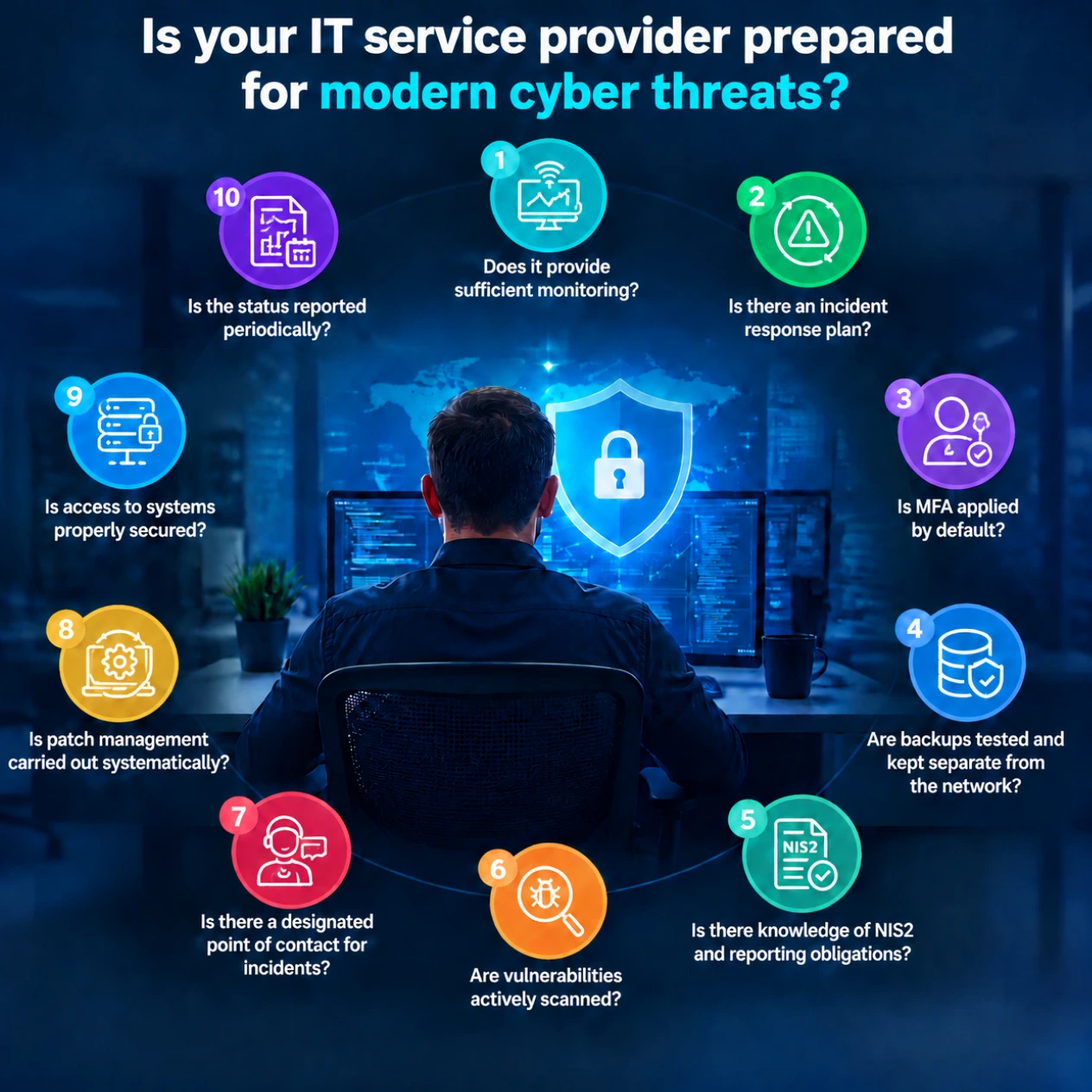
A checklist for your IT service provider comes down to ten things being in order: monitoring outside office hours, an incident response plan, MFA, tested and separated backups, knowledge of NIS2 and the reporting obligation, vulnerability scans, a fixed point of contact, structured patch management, secured access and periodic reporting.
For every "yes", ask for proof, such as a report or a dated screenshot. "We have that covered" is not an answer. This MSP checklist works for IT service providers, but also for SMEs that want to assess their IT service provider or want to know more about how things are arranged for them.
It is Friday, 11:10 pm. An account logs in to your server from a country you do no business with. The monitoring tool sees it and sends an email. To an inbox that opens again on Monday at half past eight.
That is not continuous monitoring, but a tool that works. Good enough, but not when it comes to security monitoring. On top of that, Sophos found that 88% of ransomware was deployed outside office hours. Finally, it matters that someone actually acts on that alert. An alert is one thing, doing something with it is another.
Follow-up question: Who looks at a critical alert at two in the morning on a Saturday, and what is that person allowed to do without calling me first?
Every IT provider says they "act immediately" during an incident, but is that really true? Ask for the plan on paper. A good plan sets out in advance who isolates systems, who runs the investigation, who calls your insurer and who prepares the report to the regulator.
Your IT provider's plan also has to fit yours. If your plan says the IT provider disconnects the network, that has to be in their plan too, with the name of the person who does it. A plan on paper is a good start, practising the incident response plan is even better.
Follow-up question: Does your IT provider have a plan? When did you last practise it, and what went well or wrong at the time?
Multi-factor authentication (MFA) is the cheapest and quickest measure on this list.
"By default" is the key word here. Make sure MFA is switched on for every account in your company and ask your IT provider whether that is really the case. Nothing is as annoying as finding out afterwards that MFA was apparently not enabled on every account.
The biggest risks are in the admin accounts. Think of the accounts your IT provider uses to log in to your environment, and the remote management tool (RMM) they use to serve all their clients. Whoever takes over that account gets in everywhere.
Follow-up question: "Is MFA enabled on every account, including the management tools you use to log in to our systems? Are there exceptions, and which ones?"
A good backup makes an attacker's ransom worthless. That is why attackers go after backups first. In a study commissioned by Sophos in 2024, 94% of organisations hit by ransomware said the attackers had tried to compromise their backups. In 57% of those cases they succeeded.
So two things have to be right. At least one copy is kept apart from the network, offline or immutable, so ransomware cannot reach it. And restoring has been tested. A green tick in the backup panel only says that a file was created (not that you can actually use it). We have also published a practical article on what to do about ransomware.
Follow-up question: "Are our backups tested, and are they separated from the company network?"
Since 15 August 2026, the Dutch Cybersecurity Act (Cyberbeveiligingswet), the Dutch implementation of NIS2, has been in force. According to the Dutch NCTV, a significant incident must be reported within 24 hours with an early warning, within 72 hours with an incident notification and no later than one month after that with a final report. The clock starts the moment you become aware of the incident. And it is usually your IT provider who spots it first. So they need to be able to judge when an incident is significant, and warn you in time.
Your provider may fall under the act itself. The Dutch Authority for Digital Infrastructure (RDI) lists "managed service providers and managed security service providers" as a sector under supervision. Notably, in the RDI's NIS2 quick scan, organisations from that sector themselves indicated that their reporting procedure for significant incidents and their supply chain risks still need work.
Follow-up question: "Does your company fall under the Cybersecurity Act itself, and who on your side decides whether an incident at our company has to be reported?"
An IT provider that scans actively knows which systems have a known vulnerability or are behind on updates before an attacker does. That goes beyond Windows updates. It also covers the firewall, the VPN, the printer with a web interface and that one old server running the planning software. Scanning and patching are two different things: scanning tells you what is exposed, patching (point 8) closes the gap.
Follow-up question: "How are vulnerabilities in our systems found, and which risks are still open right now?"
When something breaks, you call or email the service desk and either get a ticket number or are helped right away. During an incident you do not want that. Then you want a name, a backup person, a number that is answered outside office hours too, and an agreement about what that person may do without consulting you.
Also agree on who makes decisions on your side. An IT provider that has to take action to contain a cyber incident needs to know who they can wake up.
Follow-up question: "Who do I call when things go wrong while my regular contact is on holiday?"
Structured patching means applying updates and patches to systems on a regular schedule, so your environment keeps running securely. With the rise of AI, it is even more important to set this up properly and to patch critical vulnerabilities as quickly as possible. It is also important that there is a list of outdated systems, each with a date on which it will be replaced. "We patch when we get round to it" is not structured.
Also ask about the IT provider's own tools. In July 2021, attackers abused a vulnerability in the Kaseya VSA management software to deploy ransomware at the clients of managed service providers. CISA then advised MSP customers, among other things, to understand the supply chain risks of their MSP. A single vulnerability in that management platform hit every client that used it.
Follow-up question: "How quickly do you install a critical update on our systems, and where can I see that?"
One shared admin account that all of the IT provider's technicians use to log in to your systems is, just like in dating, a red flag. Nobody knows who did what, and a former employee keeps access for as long as the password is not changed.
Properly secured access looks different. Every administrator has their own account with MFA and only the rights they need, and there is monitoring in place to see which administrator did what and when. Remote access should go through a secured route, not through an open remote desktop port exposed to the internet. CISA gave the same advice after Kaseya: MFA on every account and admin rights based on the principle of least privilege.
Follow-up question: "How many people at your company can access our environment, and can I see that list?"
What you cannot see, you cannot assess. A monthly or quarterly report shows what was detected and resolved, what is still open and what the next step is. In language you understand as the owner of the business.
That report is more than a formality. When a large client asks in a supplier questionnaire how you handle incidents, or your insurer asks, this is your proof.
Follow-up question: "Can I see last month's report, and how have the open points been handled since last time?"
Most IT service providers serving SMEs are strong at IT management: workstations, networks, Microsoft 365, the printer that refuses to work yet again. Security asks for something else, namely people who assess alerts during and outside office hours and know how attackers operate. Security is a profession in its own right, not something you do on the side.
Terminating your contract is not a strategy, and it is not something we recommend. Start with a conversation and use this list. For every "no" or "partly", discuss whether your IT provider will solve it themselves, when, and how you will see that. Put the agreements in writing, for example in an SLA (a document recording the working agreements between you and the IT provider).
Can or will your IT provider not cover points 1, 2, 6 and 7 themselves? Then you still have the option of working with a managed security service provider (MSSP). This is a specialised company (such as Peakproteqt) that delivers monitoring and incident response. The advantage is that you stay with your trusted IT provider and get the best of both worlds. IT management stays where it was, and security is added.
Peakproteqt works with IT service providers in a cybersecurity partnership. Your IT provider keeps doing the IT management and keeps the client relationship, including invoicing. We handle monitoring and incident response in the background. If your IT provider wants, this happens under their own name (fully white-label or co-branded).
These are the checklist points we then cover:
For the IT service provider there are no sign-up fees and no minimum purchase. The partnership starts with an intake. After that, your IT provider chooses the branding, we put contracts and SLAs in place, and the reporting runs under their name. You can read exactly how this works on our page about cybersecurity for IT service providers.